- Print Configuration Status
- Auto Media Calibration
- Reset Serial Port Configuration
- Reset to Factory Defaults (release and within 2 seconds hold for 1 blink to Reset Network).
- Set the printer print width
- Set the printer darkness
- Perform Manual Calibration and print Sensor profile
Zebra ZD620 and ZD420 - Media calibration
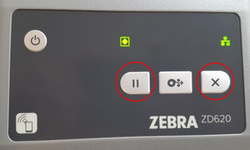
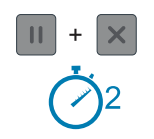
press and hold the PAUSE and CANCEL button for 2 seconds and release.
Zebra ZD620 and ZD420 - Reset
- Turn off the printer
- Press and hold while turning the printer back on:
- PAUSE and CANCEL for Network Reset
- PAUSE and FEED for Factory Reset
- Continue holding the buttons until only the status indicator light is on